Adding a battery to your existing solar system: cost, compatibility & steps
One of the most common questions we hear is: If I already have solar panels can I add battery storage without starting over? The short answer is: Yes! (In most cases.) You don’t need a brand-new system. But the process — and the cost — depends a lot on what your current setup looks like, why you want to add storage, and the details of your electricity rate plan.
Here’s a primer to help you get started.
Want a free, no-pressure estimate? Head over to our marketplace.
Do you actually need a battery?
Before diving in, it’s worth asking the question directly – because the answer isn’t the same for every solar homeowner.
You probably want a battery if:
- Your utility has eliminated or reduced net metering (California’s NEM 3.0 is the clearest example: export rates dropped to as low as a few cents per kWh, making self-consumption far more valuable than exporting)
- You live in an area with frequent outages, and your panels currently shut off during them
- Your utility charges time-of-use rates and your evening electricity bill is high
- Energy independence is a long-term goal and you want to reduce reliance on the grid
You may not need one yet if:
- You’re on a grandfathered NEM 2.0 agreement – your export rates are still strong enough that exporting solar is financially competitive with self-consumption
- Your grid is stable and backup power isn’t a priority
- Your budget is constrained. In that case, making sure your next inverter is battery-ready is worth more right now than buying the battery itself
Why homeowners with solar are adding batteries now
A lot of people went solar back when battery storage was more expensive and less accessible, and net metering policies were different. The panels made financial sense on their own. But battery prices have come down significantly, and the value proposition has shifted. This is especially true as utility rates climb and grid outages become more frequent.
The most common reasons we hear for wanting to add storage from existing solar owners are:
- They want backup power. Their panels keep generating electricity during a sunny-day outage, but without a battery, that power can’t reach the home (grid-tied systems shut off during outages for safety reasons). And traditional generators are dirty, loud, and increasingly expensive with fuel prices soaring.
- They want to store solar energy for evening use. Most solar panels generate peak power midday, but home energy use peaks in the evening. A battery lets you use your own solar-generated electricity instead of buying it back from the grid at peak rates.
- Their utility changed the rules. Net metering policies have tightened in many states, meaning solar owners get less credit for excess power sent to the grid during certain times. Storing it yourself to use, or send back to the utility, later can pay off.
The financial case: TOU rates and what your utility pays for your solar
Even if backup power isn’t your main motivation, the math on batteries has improved a lot — and two utility pricing trends are driving that.
Time-of-use (TOU) rates. Many utilities charge different rates depending on when you use electricity. Peak hours — typically late afternoon through evening, roughly 4–9 p.m. — cost significantly more than off-peak hours. In California, for example, peak rates can run 2–3x higher than off-peak rates depending on your utility and plan.
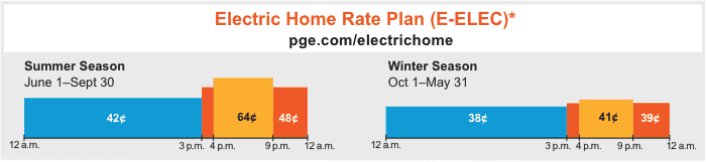
Here’s the problem for solar owners: Your panels produce the most power midday, when rates are lowest. Without a battery, that energy either gets used immediately (great) or exported to the grid at the low off-peak rate (see below). Then when you actually need electricity in the evening, you’re buying it back at the expensive peak rate.
A battery flips this equation. You store the cheap midday solar energy and use it in the evening when grid power is most expensive — so instead of buying peak-rate electricity, you’re using the electricity your panels generated during the day. Depending on your utility’s rate structure, this alone can meaningfully shorten a battery’s payback period.
Variable export rates (and the decline of true net metering). For years, net metering made it easy to export excess solar to the grid and get nearly full retail credit for it. That’s changed in a lot of states. California’s NEM 3.0, for example, took effect in 2023 and cut export rates dramatically — in some cases to as low as a few cents per kWh. Similar shifts have happened or are coming in other states.
The practical effect is that exporting excess solar is now worth much less than it used to be. As we discussed above, storing it in a battery and using it yourself is worth considerably more, since you’re offsetting electricity you’d otherwise buy at full retail rates. But variable export rates add another layer to the equation. Not only can you use electricity from your battery, you can send it from your battery to the grid during times when the utility is paying the most.
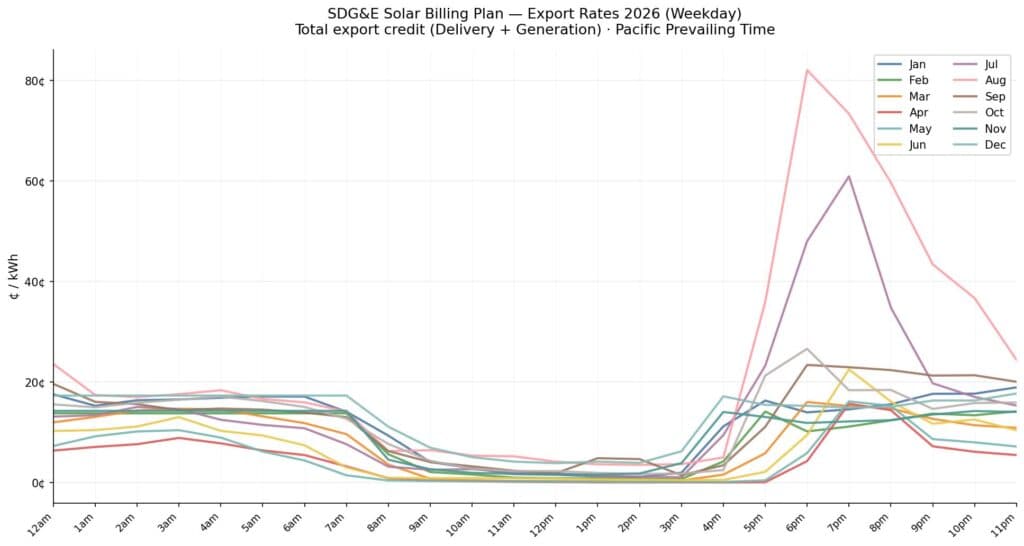
Let’s look at California again. In August, from about 9am to 4pm the rate the utility (in this case SDG&E) pays homeowners is around $.05 per kilowatt hour (kWh). But, on August evenings that rate jumps to more than $0.80 for the same amount of electricity. Storing energy and sending it to the grid when it’s needed, then, can really pay off.
As utilities continue moving toward TOU pricing and tweaking export rates, the case for pairing storage with existing solar gets stronger.
What determines whether your system is battery-compatible?
The key factor is your inverter — the box, usually mounted on an exterior wall or in your garage, that converts the DC electricity your panels produce into the AC electricity your home uses.
There are three main types:
String inverter (most common in older systems). One central inverter handles your whole array. Adding a battery to a string inverter system typically requires an AC-coupled battery — one that has its own built-in inverter, like the Tesla Powerwall 3. It connects to your electrical panel and works alongside your existing setup without replacing anything.
Microinverter system (Enphase is the most common). Each panel has its own small inverter. These systems pair well with AC-coupled batteries. If you have Enphase microinverters, the Enphase IQ Battery is designed to integrate seamlessly, though other AC-coupled batteries work too.
Hybrid (or “storage-ready”) inverter. If your system was installed more recently, it may already have a hybrid inverter that was designed from the start to accept a battery. As you may have guessed, this can make adding storage more straightforward and less expensive.
If you’re not sure which inverter type you have, your original installer paperwork should list the make and model. An installer can also identify it quickly during a site visit.
AC-coupled vs. DC-coupled: what’s the difference?
You’ll likely come across these terms when shopping for batteries. Here’s what they mean in plain English.
AC-coupled batteries connect to your home’s AC electrical system — the same wiring your appliances use. They work with virtually any existing solar setup and are the most common retrofit option. The slight trade-off is a small efficiency loss, since energy gets converted a couple of extra times (DC from panels → AC for home → DC to store in battery → AC back to home).
DC-coupled batteries connect directly to your solar panels before the inverter, which is more efficient but usually requires replacing your existing inverter with a compatible hybrid model. This makes more sense for brand-new installs than retrofits, though in some cases it’s worth it.
For most homeowners retrofitting an existing system, AC-coupled is the practical choice.
Which solar battery is best for your home?
There are many battery storage manufacturers. The three you’ll see most often in the U.S. are Tesla, Enphase, and Franklin. The right choice depends on your inverter type, how much of your home you want to back up, and your budget. Here’s how they compare:
| Battery | Capacity | Power output | Installed cost range | Best for |
|---|---|---|---|---|
| Tesla Powerwall 3 | 13.5 kWh | 11.5 kW | $12,000–$16,000 | Whole-home backup including AC and EV chargers; highest surge capacity of the three |
| Enphase IQ Battery 5P | 5 kWh per unit (stackable) | 3.84 kW | $10,000–$14,000 (single unit) | Microinverter systems; best option if you want to start small and add capacity over time |
| Franklin aCDU | 13.6 kWh | 5 kW continuous | $11,000–$15,000 | Whole-home backup; broad inverter compatibility including older string inverter systems |
All three carry 10-year warranties and support grid islanding. This means they’ll keep your home powered during an outage even when the grid is down. Tesla’s storm watch mode automatically charges the battery ahead of predicted weather events. Enphase allows you to add capacity modularly as your needs grow. Franklin is often the most compatible option for older string inverter systems where Tesla and Enphase may require additional hardware.
For resilience and outage protection: Tesla Powerwall 3 handles the highest surge loads and is the strongest option for whole-home backup. Franklin aCDU is close behind with strong whole-home coverage and broader inverter compatibility. Enphase IQ is best for partial-home or essential-circuits backup, especially on microinverter systems.
For long-term energy independence and TOU savings: All three are effective. Your payback period depends more on your utility’s rate structure than which battery you choose. An Aurora installer can model your specific savings based on your current bill and utility plan.
What does it cost to add a battery to an existing solar system?
The most common question we get after, “Can I do it?” is, “What will it cost me?” The short answer: a single battery unit, fully installed, typically runs $12,000-$18,000 depending on brand, your location, and what your existing system requires. That range breaks down by brand in the table above. However, there are a few cost drivers worth knowing upfront:
- Inverter type: AC-coupled retrofits (the most common for existing systems) add a conversion step but don’t require replacing your inverter. DC-coupled installs are more efficient but may require a new hybrid inverter, adding $2,000-$5,000 to the project.
- Electrical panel upgrade: If your panel is older or at capacity, your installer may recommend an upgrade. That typically costs $2,000-$4,000. It’s not always required, but worth budgeting for if your home is 15+ years old.
- Number of units: A single battery covers essentials for most homes during an outage. Two units are needed for whole-home coverage or longer backup duration.
- State and utility incentives: The federal 25D homeowner tax credit expired at the end of 2025 (more on that below). However, many states have their own rebate programs. For instance, California’s SGIP offers meaningful rebates specifically for home battery storage. Ask your installer what’s available in your area before assuming the federal picture is the whole story.
Adding a second unit (for more storage or whole-home coverage) adds roughly $8,000 to $12,000 more.
Those are the before-incentives numbers. Speaking of…
What about incentives?
This is where things have gotten a little complicated in 2026, so it’s worth understanding your options.
The short version: the 30% federal tax credit that homeowners used to claim directly on their returns (the 25D credit) expired at the end of 2025 under the One Big Beautiful Bill Act. However, a separate 30% credit (the 48E) is still available to companies that own solar and storage systems. That’s what makes prepaid leases attractive right now, as we covered in detail in our solar tax credit post.
For an outright battery purchase in 2026, the direct homeowner credit is no longer in play. However, many states still have their own incentives, rebates, or utility programs. California’s SGIP program, for example, provides rebates specifically for home battery storage. Your installer will know what’s available in your area.
The takeaway: get quotes, ask specifically about state and utility incentives, and don’t assume the federal picture is the whole story.
Get a real estimate of what adding storage would cost for you in our marketplace.
How to get it done
Adding a battery to an existing solar system is a job for a licensed installer — ideally one who’s certified by the battery manufacturer you’re considering (Tesla, Enphase, Franklin, etc.). The process typically looks like this:
- Site assessment (1-2 weeks). An installer evaluates your existing equipment . That includes inverter type, panel capacity, electrical panel condition, and where the battery will be located (garage, utility room, exterior wall). They’ll confirm which battery is compatible with your setup and flag any electrical upgrades needed before work begins.
- Permit application (1-3 weeks). Battery installations require electrical permits in most jurisdictions. A good installer handles this for you, including any utility paperwork. California and a few other states have additional requirements that can extend this step.
- Utility interconnection notification (1–2 weeks, runs parallel to permitting). In most states, adding a battery to a grid-tied system requires notifying your utility. This is typically a form submission, but it needs to happen before activation.
- Installation (usually 1 day). The battery unit is mounted, wired to your inverter or a critical loads panel, and connected to the monitoring system. For a standard AC-coupled retrofit (which is most existing-system installs) this is typically a half-day to full-day job. More complex retrofits requiring panel upgrades or additional wiring take longer.
- Inspection and sign-off (1–2 weeks). Your local authority having jurisdiction (AHJ) inspects the installation before the system goes live. After the inspection passes, your installer activates and tests the battery.
- System go-live and onboarding. You’ll get access to monitoring via the battery manufacturer’s app (Tesla, Enphase, or Franklin each have their own). Your installer should walk you through backup settings, storm watch configuration if applicable, and how to set TOU optimization so the battery charges and discharges at the right times.
Total typical timeline: 4-8 weeks from first contact to go-live. Complex electrical upgrades or slow permitting jurisdictions can push this to 10-12 weeks. Getting quotes from multiple installers early is the best way to keep things moving.
The best starting point is getting a few quotes from local installers who specialize in battery storage. Aurora works with vetted installers across the country.
Get a free estimate here and you can specify that you already have solar and want to add storage.
Frequently asked questions
Can I add any battery to my existing solar system?
Not quite. Compatibility depends on your inverter type. Most existing systems can work with AC-coupled batteries like the Powerwall 3, but it’s worth having an installer confirm before you buy anything.
Will a battery let my solar panels run during a power outage?
Yes, that’s one of the main reasons to add one. Grid-tied solar systems automatically shut off during outages (for the safety of utility workers). A battery with backup capability creates an “island” that lets your solar and storage keep powering your home even when the grid is down.
See our article on battery backup vs. generators to learn more.
How much of my home can a battery power?
It depends on the battery’s capacity and your home’s energy use. A single 13.5 kWh battery can typically run essentials — fridge, lights, phone charging, Wi-Fi, a few outlets — for 8 to 12 hours, depending on your consumption. Two units can cover most homes overnight or through a short outage.
Do I need to replace my existing solar panels?
No. Adding a battery is a separate upgrade from your panels. Your panels keep doing what they’re doing; the battery just gives you somewhere to store the energy they produce.
How long does installation take?
Most single-battery retrofits are completed in one day. More complex jobs, especially those requiring panel upgrades or significant rewiring, may take longer.
Is it worth it to add a battery if my system is older?
It definitely can be, especially if your panels are still producing well and your inverter is in good shape. An installer can assess whether your existing equipment is a good candidate.
Can a battery help with TOU rates even if I don’t need backup power?
You know it! For many homeowners, this is the primary financial motivation. If you have TOU plan, a battery configured for “self-consumption” or “time-of-use optimization” mode will automatically charge during cheap midday hours and discharge during expensive peak hours.