How Aurora caught a misstep early — and what it means for the designers and installers on your team
There is a cartoon from the 1960s that product teams still pass around today. In the first panel, management approves a cost-conscious plan. In the second, engineering builds something technically correct. In the third, maintenance installs whatever showed up. And in the fourth, all the homeowner ever wanted was a tire swing.
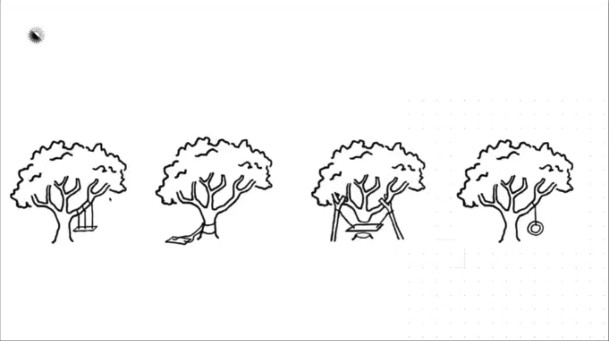
Every department did its job. Every handoff was fine. And somehow, the final product still missed the point entirely — because nobody talked to the person who was actually going to use it.
At our Empower conference, Product Manager Elia Magari and Expert Design Services manager Giovanna “Gio” Melguizo opened their session with that cartoon for a reason: Aurora almost ended up in panel three. This is the story of how they caught it and what they built instead.
The data said something different
When Aurora first shipped Aurora AI, it was built for the sales rep at the kitchen table. The whole product was tuned for that moment — under ten seconds, no design background required, proposal-ready output. AI for salespeople, not for designers.
That model stayed intact through v2, even as it got faster and smarter. Then we looked at the usage data and found something unexpected.
A major inflection had happened in 2024 — 62% of all Aurora AI runs were happening in Design Mode. Professional designers were using a tool built for sales reps, at scale, in a workflow Aurora had never designed for them.
There were two ways to read it. One was that designers were using the tool wrong. The other was that they were telling us what the tool actually was.
We believed the designers.
The proving ground
Rather than ship an updated product and wait to see if it worked, we ran the experiment ourselves using Expert Design Service (EDS) — real designers doing real production volume for customers every day. If AI for designers actually moved the needle on soft costs, our own cost line would be the first indicator.
The pilot looked at three metrics: acceptance rate, edit rate, and rejection rate. And, critically, EDS and the product team defined success before a single line of code shipped. They agreed on the time savings threshold that would justify changing the workflow. When the data came back, there would be no moving the goalposts.
What they found first wasn’t the wins. It was three gaps that would have made a full rollout impossible.
The first was a UX issue. When AI roof was triggered via API, it was automatically accepted, which gave designers no fast way to reject a bad model. That killed time savings. But more importantly, it broke the feedback loop: every accept, edit, and reject gets recorded and fed back into the AI. Without a reject button, the model couldn’t learn.
The second gap was tracking. Once the pilot expanded, there was no way to tell AI-assisted designs apart from manual ones. “We had results we believed in, but we couldn’t prove it,” Gio said. “And if you can’t prove it, you can’t scale it.”
The third was imagery. The API workflow defaulted to the first available image for each site, which isn’t always the best one. Designers were getting AI models built on outdated or skewed imagery, then spending time correcting them — the exact opposite of what the project was supposed to accomplish.
After they fixed all three the results held.
What the numbers actually showed
75% of EDS requests used an AI SmartRoof that was accepted and edited. 83% of those models needed some edits. Only 6% were rejected outright.
And it saved two to four minutes per model.
That might not sound like much. But EDS operates on roughly 30-minute turnaround times. Two to four minutes per design, across hundreds of projects, is the difference between hitting SLAs and missing them. It’s also the kind of efficiency gain that doesn’t come from hiring more people or pushing teams harder. It comes from removing the hardest part of every job: the blank canvas.
“The signal here isn’t that AI is perfect,” Gio said. “It’s that designers are choosing to start with an AI output rather than from a blank slate. That’s the behavior change that really matters.”
AI raises the floor, it doesn’t replace the expert
For installers thinking about what this means for your own design teams, the clearest takeaway is that AI isn’t coming for your designers. It’s changing what they spend their time on.
The barrier to high-quality solar design used to be CAD expertise, which required years of training in a specialized tool. That kept good design scarce. Scarce design kept proposals slow. Slow proposals lost deals.
What AI does is remove that barrier. Not by replacing the expert, but by giving the expert a starting point good enough that everyone else in the workflow can meaningfully contribute. The designer becomes an editor. The sales rep at the kitchen table can produce something that used to take a CAD expert 30 minutes.
As Gio put it: “Even in a world where AI output is really good, you’re still going to need a human to validate the design against constraints that just aren’t visible in aerial imagery — structural limitations, permitting quirks, a conversation with a homeowner that changes the scope. It’s just changing what designers focus on.”
Soft cost reduction doesn’t mean fewer people. It means the people you have are spending their time on the decisions that actually require their judgment.
What’s coming next
The EDS pilot has moved from experiment to standard workflow. When a designer opens a project now, the AI model is already there waiting. The results from the US also held true in Germany, where we ran a separate LiDAR study and landed in the same place.
The roadmap from here is focused on the next layer of manual work that AI can absorb. Three projects are all attacking the same problem from different angles: the time it takes to model trees.
AI tree detection will automatically identify trees from aerial imagery and LiDAR data — location, canopy spread, height — with a single click. A task that currently takes five to ten minutes on a heavily vegetated site is being targeted at under thirty seconds.
LiDAR shading will move EDS designers away from manual tree modeling by default, falling back to manual only when LiDAR quality isn’t good enough. On complex, heavily vegetated sites, this can save a designer up to 10 minutes per project.
LiDAR editing addresses something that LiDAR shading can’t handle alone: situations where a homeowner plans to remove a tree, or the LiDAR data predates a tree on the property. Instead of abandoning LiDAR shading entirely for a single outlier, designers will be able to draw a shape around the relevant section and remove just that piece.
Further out, we’re exploring AI for existing panel detection — automatically identifying what solar equipment is already on a roof for battery retrofit proposals, which can’t be proposed in Sales Mode right now. If that gets solved, an entire category of proposals moves to the kitchen table for the first time.
Watch the full session on demand
We looked at the highlights, but the full session goes further including a Q&A on rejection rates, the methodology behind continuous model improvement, and how the Germany LiDAR pilot played out. If you want the complete picture of where Aurora AI is headed and what it means for the designers and sales reps on your team, the session is available on demand. (And you’ll get a free NABCEP CUE if you watch to the end.)
Watch the Empower Aurora AI Session →
This post is based on a session from Aurora Solar’s Empower conference, featuring Elia Magari (Product Manager, Aurora AI) and Giovanna Melguizo (Expert Design Services Manager, Aurora Solar), with Q&A hosted by Rachel Liddell.